DAC — Dispatched Agent Connector
DAC connects agents into your product via REST API — free, MIT open source, self-hosted.
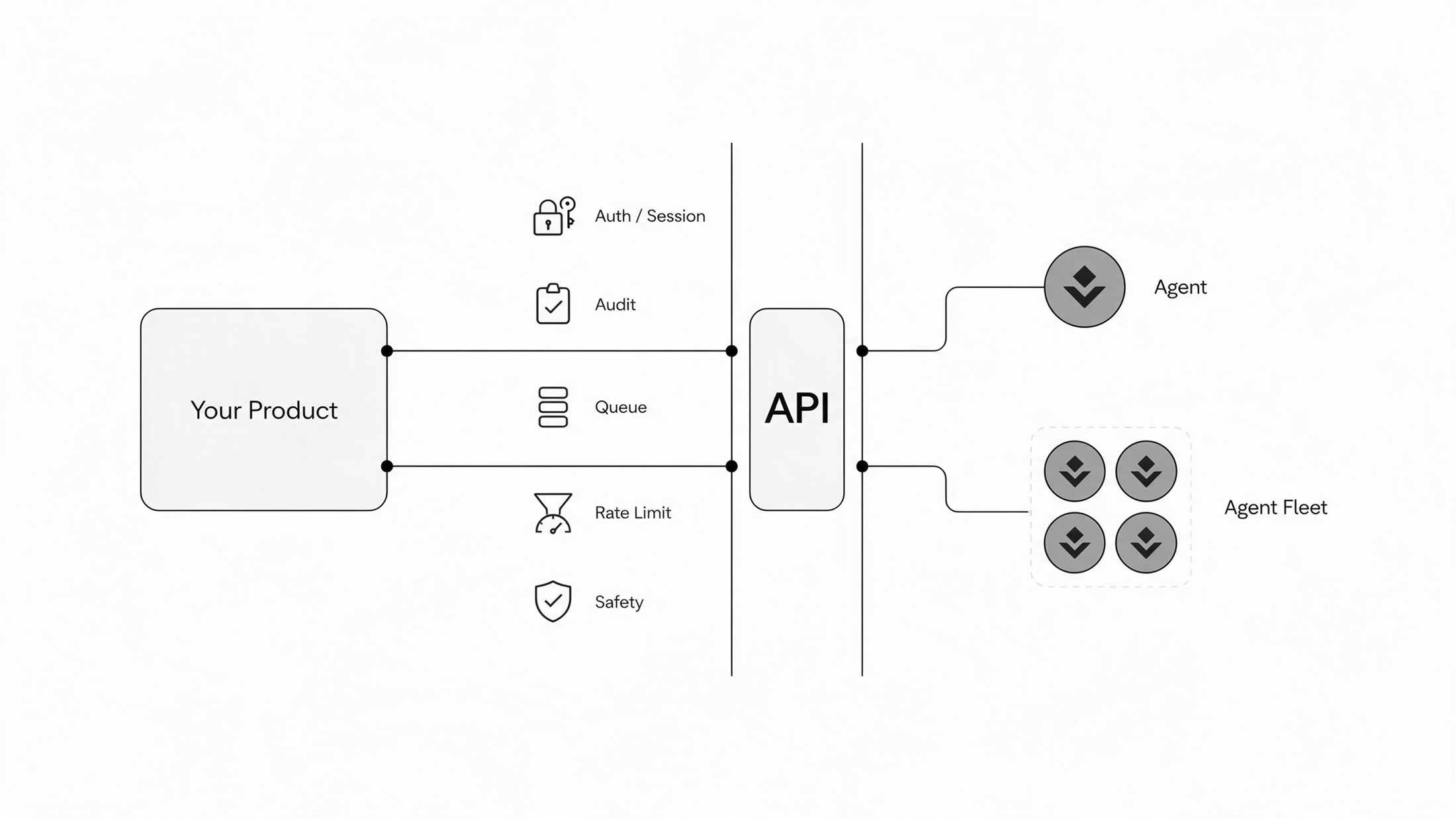
How it plugs in
REST / SSE
Plug a ready node into your product over one HTTP endpoint — streaming SSE conversations, the fastest way to ship an agent feature.
dsh + ohdsh-api-facade
Assemble your own node from MIT parts: the DeepSeek Harness engine plus our facade plugin — a keyed REST face on any DSH instance.
pi + pi-api-facade
Bring Pi agents to the same API: our facade turns a Pi agent into an HTTP REST endpoint — one gateway, both runtimes.
DAC cluster
Grow into a fleet: machines, topology, per-workspace billing, audit trail and brain dispatch — the platform form of the same API.
More on the roadmap — the unified SDK (TypeScript / Python).
Quick start
git clone https://github.com/litestartup-com/dsh-api-gateway
cd dsh-api-gateway
bash docker/gen-env.sh           # edit .env: OPENAI_BASE_URL + OPENAI_MODELS — any OpenAI-compatible API
docker compose up -d --build # API: http://<host>/api-gw/v1 · X-Api-Key: GW_KEYgit clone https://github.com/litestartup-com/pi-api-facade
cd pi-api-facade
cp .env.example .env # fill PI_FACADE_API_KEYS + OPENAI_BASE_URL (+ OPENAI_MODELS)
mkdir -p workspaces
docker compose up -d --build # API: http://localhost:8090/api-gw/v1curl -fsSL https://raw.githubusercontent.com/litestartup-com/hellodac/v1.0.0/install.sh -o install.sh && bash install.shirm https://raw.githubusercontent.com/litestartup-com/hellodac/v1.0.0/install.ps1 -OutFile install.ps1; powershell -ExecutionPolicy Bypass -File .\install.ps1One command, up in five minutes. The scripts are idempotent — re-runs never overwrite config or data. The only input needed is your model API key; first login forces a password change. Full walkthrough: Quick start guide.
What it gives you
Fleet topology
One manager, machines joined by a node agent, nodes as container workers or host processes — with a live topology view and heartbeat edges.
Unified conversation
Talk to every node from one place: streaming, tool cards, approvals, per-session model and access mode.
API access
Every node is reachable through one gateway prefix, so third-party clients get the same agents the UI has.
A brain that dispatches
Cross-domain planning with delegation frames — read-only on workspaces, execution is always delegated.
Operations built in
Audit log, peak/off-peak cost with budget breakers, encrypted backups with restore drill, self-update with automatic rollback.
Bilingual UI
English by default, Chinese one click away; adding a language is one JSON file plus one registry line.
Skills & schedules
A skill inventory per workspace and a scheduler API for unattended runs, behind a daily budget breaker.
Native GUI, one click
Open any node's native DSH UI in one click — a loopback SSH tunnel keeps the key on your machine; local nodes open directly.
Safe by default
Loopback-only node ports, approval cards for dangerous operations, agent tokens that rotate with a grace window.
Use cases
Enterprise customer service
Route every support channel into one intelligent cluster — each channel lives in its own workspace, agents answer from shared context with a full audit trail, and customers reach them through unified conversation and API.
Agent-powered products
Put DAC agents behind your product — one REST API, any runtime, from a single node to a cluster, no per-node plumbing.
Personal fleet, one manager
Deploy agents on your home server, workstation and cloud box, then manage them all from one manager. Nodes keep running when the manager is down and reconcile on recovery.
Team AI middle platform
One manager for a small team: shared peak/off-peak billing with per-workspace breakdowns, a skill inventory per workspace, and scheduled unattended runs behind a daily budget breaker.
Ops assistant on critical servers
Run a full-access ops node on production machines. Dangerous operations pass approval cards for human sign-off; server credentials stay on the node's machine and are never shipped by the manager.
Multi-machine fleets
Join more servers with one command each — zero inbound ports. A live topology shows manager → machines → nodes with heartbeat edges, plus per-machine CPU, memory and disk.
How it works
your product → one REST API → DAC cluster → facade (ohdsh / pi) → agents (DSH / Pi) → sessions → workspaces
| Layer | What it does |
|---|---|
| facade | The keyed REST face of one runtime: ohdsh-api-facade serves DSH nodes, pi-api-facade serves Pi agents — one frozen contract, one API reaches both. |
| DAC manager | The cluster control plane: services, dispatch, sessions, metering, audit, backups — grow from one agent to a fleet behind the same API. |
| agents (DSH / Pi) | One process per agent: its own workspace, permission tier and sandbox; every run leaves a git trace. |
FAQ
What do I need to run it?
A server (Linux containers recommended, Windows bare metal supported) and a model API key — any OpenAI-compatible API works.
Is it free?
Yes. DAC, ohdsh-api-facade, pi-api-facade, and DeepSeek Harness are all MIT open source — free to use, modify, and self-host under the MIT license. You only pay your model provider.
Does it replace DeepSeek Harness?
No. DeepSeek Harness provides the agent runtime; DAC provides the control plane on top: auth, chat relay, brain dispatch, node and machine management, skills, cost, backup.
What happens when the manager goes down?
Nodes keep running. The node agent dials out, so there are zero inbound ports; it reconnects and reconciles when the manager recovers.
What's the difference between DAC and hellodac?
hellodac is the platform — the unified agent capability layer for your product. DAC (Dispatched Agent Connector) is its flagship product: the manager that turns nodes into a fleet.
Which agent runtimes does it support?
DeepSeek Harness and Pi today — via ohdsh-api-facade and pi-api-facade — with one API and one SDK across runtimes.
Which models does it support?
Any OpenAI-compatible endpoint — OpenAI, OneAPI/new-api proxies, vLLM, Ollama and friends — configured via OPENAI_BASE_URL + OPENAI_MODELS. The same config variables drive DSH and Pi nodes alike.
Bring DAC agents into your product today
v1.0.0 — the first public release, MIT open source. One agent via docker, or a fleet via the DAC manager — both exercised by the project's own smoke tests before every release. See the changelog for what ships, and the blog for the announcement.